Client-Side Verilog Synthesis for CircuitVerse | GSoC 2026 | Final Report

TL;DR: Over twelve weeks of GSoC 2026, we brought client-side Verilog synthesis to CircuitVerse’s Tauri desktop app. Users can now write Verilog and have it compiled into a working circuit entirely on their machine, without a network round-trip. The pipeline runs YoWASP Yosys (WebAssembly) inside a Web Worker, with a VFS guard for output validation, a human-readable error parser, a timeout guard, and worker lifecycle management. In the second half, we migrated the Verilog terminal to reactive Pinia stores, wrote parity tests that run real WASM synthesis against reference fixtures, and authored comprehensive contributor documentation covering the full architecture.
1. Where this project fits
CircuitVerse is used by hundreds of thousands of students and educators to design and simulate digital circuits visually. But when it comes to Verilog, the platform had a gap. There was no way to compile Verilog code into a circuit without depending on an external server.
Client-Side Verilog Synthesis fills that gap. The idea is to move the Verilog synthesis engine from the server to the browser using WebAssembly, so the Tauri desktop app can compile circuits fully offline without a network round-trip. No server, no internet. Just write Verilog and hit synthesize.
2. What we shipped (full project)
Here is everything that was built and delivered across both phases:
Phase 1: The synthesis pipeline
- A Web Worker that runs YoWASP Yosys (WASM) off the main thread to keep the UI responsive
- A VFS guard that validates the Yosys virtual filesystem output before parsing
- A human-readable error parser that translates cryptic Yosys tokens into plain English
- A timeout guard that kills runaway compilations after 30 seconds
- Worker lifecycle management that recycles the worker every 50 runs to prevent unbounded WASM memory growth
Phase 2: Hardening, testing, and documentation
- Migrated the Verilog terminal output system from
windowglobals and DOM manipulation to reactive Pinia stores - Built a reactive
VerilogTerminal.vuecomponent powered bysynthesisStoreandverilogStore - Fixed terminal visibility bugs, cleaned up i18n keys, and refactored the theme selector
- Wrote parity tests that run real WASM synthesis on 5 reference circuits (AND gate, D flip-flop, full adder, 4-bit counter, 2:1 mux) and assert exact structural equality
- Authored comprehensive contributor documentation covering the full architecture, file guide, and gotchas
3. Phase 1 recap (Weeks 1 to 5)
The first five weeks focused on building the core synthesis pipeline from scratch. A detailed week-by-week breakdown is available in the Phase 1 report.
In short:
- Week 1 set up
synthesisWorker.jsto run Yosys WASM inside a dedicated Web Worker, withVerilog2CV.json the main thread receiving the output and converting it into CircuitVerse circuit components. - Week 2 added the timeout guard and a full test suite covering valid Verilog, syntax errors, empty modules, and various edge cases.
- Week 3 built
vfsGuard.jsto validate the Yosys virtual filesystem output, handlingUint8Arrayresponses, missing files, and silent failures. - Week 4 built
errorParser.jsto transform raw Yosys error output into student-friendly messages likeSyntax error on line 7: unexpected 'endmodule', expected identifier. - Week 5 tackled worker lifecycle management to prevent unbounded WASM memory growth, and went through multiple rounds of mentor review on the error handling PR.
4. Phase 2 sprint log
Week 6 (7 to 13 Jul): Migrating Verilog terminal to Pinia stores
The old Verilog terminal output was managed through window.verilogTerminal and direct DOM manipulation using document.getElementById. This worked, but it was fragile, hard to test, and completely invisible to Vue’s reactivity system.
We migrated the entire terminal output pipeline to two Pinia stores:
synthesisStore.tsholds an array of terminal messages, where each message has atext, atype(info,error, orsuccess), and atimestamp.verilogStore.tsmanages terminal visibility and the CodeMirror theme selection.
On the simulator side (Verilog2CV.js), we introduced a lazy-init pattern for store access because this file gets imported before app.use(pinia) runs. Instead of calling useSynthesisStore() at the module level (which would crash), it uses a cached getter:
let _synthesisStore = null;
function getSynthesisStore() {
    if (!_synthesisStore) _synthesisStore = useSynthesisStore();
    return _synthesisStore;
}
Week 7 (14 to 20 Jul): Reactive VerilogTerminal component
With the stores in place, we built VerilogTerminal.vue, a proper reactive terminal panel that subscribes to synthesisStore.messages and renders them with color coding (blue for info, red for errors, green for success). It auto-scrolls to the latest message and mounts/unmounts via v-if based on verilogStore.isTerminalVisible.
This replaced all the old imperative DOM code. The terminal toggle button, the show/hide logic, and the message rendering are now fully reactive and testable.
Week 8 (21 to 27 Jul): Terminal bug fixes and i18n cleanup
After the terminal landed on main, we discovered a visibility bug where the terminal would not show up correctly in certain navigation sequences. We fixed the root cause and also cleaned up the i18n setup. Some locale keys were duplicated between src/locales/ and v1/src/locales/, causing raw key paths to appear in the UI. We made sure both places were in sync.
Additionally, we refactored the theme selector dropdown in VerilogEditorPanel.vue to use a v-model binding through the Pinia store instead of a local ref with a manual watcher.
Week 9 to 10 (28 Jul to 10 Aug): Parity tests
This was the most technically challenging part of Phase 2. The goal was to prove that our WASM synthesis pipeline produces the same circuit structure as the server. We wrote parity tests that:
- Feed a Verilog source (like a simple AND gate or a 4-bit counter) into the real YoWASP Yosys WASM engine
- Run the full synthesis command (
read_verilog,hierarchy,proc,opt,memory,wreduce,write_json) - Convert the output through
yosys2digitaljs(same converter used in production) - Assert the result matches a reference fixture JSON using
toEqual()for strict structural equality
The toEqual() matcher was chosen over toMatchObject() based on mentor feedback, since toMatchObject() only catches missing or changed fields but does nothing to catch extra fields being added. toEqual() closes that gap by enforcing exact equality in both directions.
The beforeAll warm-up step uses runYosys(['-V']) instead of runYosys([]) to guarantee the WASM module initializes and terminates cleanly without hanging. This was also a mentor suggestion based on a coderabbit flag.
Five reference circuits are tested: AND gate, D flip-flop, full adder, 4-bit counter, and 2:1 mux. Each test also verifies that every device type in the synthesized circuit is one that YosysJSON2CV can consume (AND, OR, MUX, DFF, etc.), catching any unrecognized types before they hit the renderer.
- PR: #1150 – Parity tests for Yosys WASM pipeline output (In review)
Week 11 to 12 (11 to 21 Aug): Contributor documentation and final report
The last stretch was about writing documentation that future contributors can actually use. We authored a comprehensive guide covering:
- How the pipeline works: From the user clicking “Save Code” to the circuit appearing on canvas
- File-by-file guide: What each file does (
synthesisWorker.js,clientSynthesis.js,vfsGuard.js,errorParser.js,circuitLayout.js), including the stores and Vue components - Gotchas and traps: The lazy-init pattern for Pinia stores in simulator files, the duplicated locale files between
src/andv1/src/, the console hijacking during synthesis, and the slow first-run cold start - How to run tests: Commands for running the full test suite and the synthesis-specific specs
Please scroll down to get a proper documented summary of this project.
5. Architecture overview
The synthesis pipeline follows a clean separation between the main thread and the worker:
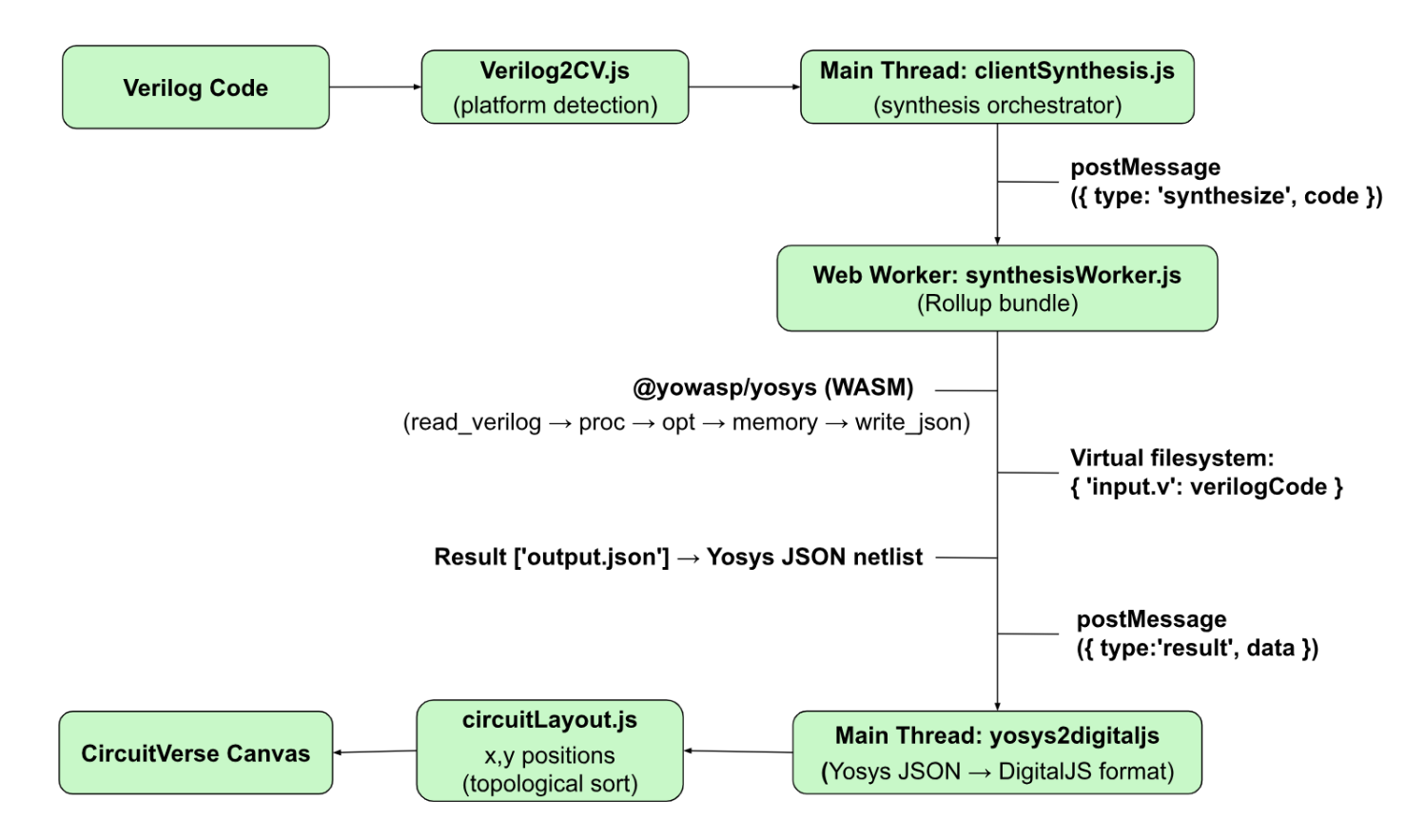
Happy path:
- User writes Verilog in the CodeMirror editor and clicks Save Code
Verilog2CV.jschecksisTauri()to decide whether to use client-side or server synthesis- For desktop (Tauri), it calls
clientSynthesis.synthesizeVerilog(code) clientSynthesis.jsspins up a Web Worker (or reuses an existing one), sends the code, and starts a 30-second timeout- The worker writes the code to the Yosys virtual filesystem as
input.v, runs the synthesis command, and reads backoutput.json vfsGuard.jsvalidates the output (exists, is a string, is valid JSON, is an object)yosys2digitaljsconverts the netlist into CircuitVerse format- The result is posted back to the main thread, which builds the circuit on canvas
Error path:
If synthesis fails, the worker captures stderr lines (via console overrides and printErr callbacks), runs them through errorParser.js, and sends back a human-readable error message. All messages (progress, errors, and success messages) flow through synthesisStore and are displayed reactively by VerilogTerminal.vue.
6. Documentation guide (summary)
Here is a condensed version of the contributor documentation, covering the key files and things to watch out for.
Synthesis pipeline files (v1/src/simulator/src/synthesis/)
| File | What it does |
|---|---|
synthesisWorker.js | Web Worker entry point. Receives Verilog code, runs Yosys WASM, validates output, converts netlist, posts result back. Temporarily overrides console.log during synthesis because the WASI shim routes Yosys stderr through it. |
clientSynthesis.js | Main-thread API. Manages worker lifecycle, enforces single-synthesis concurrency, applies the 30-second timeout, and recycles the worker every 50 runs to prevent memory growth. |
vfsGuard.js | Validates Yosys VFS output. Catches null results, missing files, Uint8Array responses, empty outputs, and invalid JSON. |
errorParser.js | Translates raw Yosys error tokens (TOK_ID, TOK_ENDMODULE) into human-readable messages. |
circuitLayout.js | Computes positions for synthesized circuit elements so they render neatly on canvas. |
Pinia stores (v1/src/store/)
| Store | What it manages |
|---|---|
synthesisStore.ts | Array of terminal messages (text, type, timestamp). The simulator pushes messages here, and the terminal reads them. |
verilogStore.ts | Terminal visibility toggle and CodeMirror theme selection. |
Things to watch out for
- Locale files are duplicated. The
v1/build uses its own locale files atv1/src/locales/, not the ones insrc/locales/. If you add an i18n key, add it to both places. - The lazy-init pattern is not optional. Any Pinia store accessed from
simulator/src/files must use the cached getter pattern. These files are imported before Pinia exists. - First synthesis is slow. Loading the Yosys WASM engine takes a few seconds on cold start. After that it is cached until the worker gets recycled.
- Worker console is hijacked during synthesis. If you add
console.loginside the worker’s synthesis path, your output will get captured as stderr lines. The originals are restored after synthesis completes.
7. All pull requests
| PR | Description |
|---|---|
| #1055 | Migrate Verilog terminal output from window global + DOM to Pinia store |
| #1111 | Migrate Tauri environment detection to official isTauri API |
| #1111 | Client-Side Verilog Synthesis via Web Worker for Tauri Desktop |
| #1105 | Timeout guard for synthesis pipeline |
| #1112 | VFS output validation (vfsGuard.js) |
| #1116 | Human-readable error parsing (errorParser.js) |
| #1124 | Worker lifecycle management (prevent WASM memory growth) |
| #1126 | Reactive Verilog terminal in /v1 using Pinia stores |
| #1167 | Terminal visibility bug fix, i18n cleanup, theme select refactor |
| #1150 | Parity tests for Yosys WASM pipeline output |
See all GSoC 2026 PRs: GitHub Gist
8. What I learnt
- WASM memory is a one-way street. WebAssembly linear memory grows but never shrinks. There is no garbage collector, no
free()that hands pages back to the browser. The only way to truly reclaim memory is to terminate the worker and start fresh. This shaped the entire lifecycle architecture. - Structured clone is not free. When you
postMessagea large object between threads, the browser deep-copies every nested property. Stripping unused metadata before crossing the thread boundary measurably reduces transfer time for complex netlists. - Defensive parsing pays for itself.
JSON.parsesucceeding does not mean you have valid data. It can returnnull, a number, or a bare string. Adding a post-parse type check (typeof !== 'object') caught real edge cases from Yosys output. - Regex anchors break in layered environments. A
^ERRORregex that works in isolation fails when the WASI shim prepends whitespace or a prefix. Removing the^anchor was a one-character fix that took two review cycles to discover. toEqual()is strictly better thantoMatchObject()for fixture tests.toMatchObject()only catches missing or changed fields. It does nothing to catch extra fields being added.toEqual()enforces exact equality in both directions, closing that gap. This was a lesson from mentor review.- Reactivity beats DOM manipulation every time. Migrating from
window.verilogTerminalanddocument.getElementByIdto Pinia stores made the terminal code shorter, more testable, and fully integrated with Vue’s component lifecycle. - Small PRs move faster than big ones. Splitting the work into focused PRs (VFS guard, error parser, timeout, lifecycle, terminal, parity tests) made review manageable and kept momentum. One large “synthesis feature” PR would still be sitting in review.
9. Future work
The synthesis pipeline is solid and fully functional for the Tauri desktop app. Here are areas that future contributors could explore:
- Multi-file Verilog support: Let users split their Verilog across multiple files with a tabbed editor, where
includestatements work across files before synthesis. - Waveform viewer integration: After synthesis, allow users to run simulation and view timing diagrams for their Verilog modules.
- Syntax highlighting improvements: Add smarter autocomplete for Verilog keywords and module port names in the CodeMirror editor.
10. Weekly blogs
| Week | Blog Link |
|---|---|
| Week 1 | Read |
| Week 2 | Read |
| Week 3 | Read |
| Week 4 | Read |
| Week 5 | Read |
| Week 6 - 7 | Read |
| Week 8 | Read |
| Week 9 | Read |
| Week 10 | Read |
| Week 11 | Read |
| Week 12 | This blog itself |
Acknowledgements
This work reflects the support of the CircuitVerse community:
Vivek Kumar, Harsh Rao, and Nihal, my mentors, provided consistent guidance, detailed code reviews, and the kind of patience that makes all the difference. Not once did they make me feel like I was asking a silly question.
Vedant Jain and Aboobacker MK as org admins set the tone from day one, making it clear this community is about growing together.
Fellow GSoC contributors kept the energy going through weekly syncs and shared learnings. Special thanks to everyone who tested the desktop builds and reported issues early.
This has been one of the most rewarding experiences of my engineering journey so far. I came in knowing how to write code. I am leaving knowing how to build software. And I am not leaving at all. CircuitVerse will continue to have my contributions beyond GSoC.
Onwards and upwards 🚀
See Also
- Client-Side Verilog Synthesis for CircuitVerse | GSoC 2026 | Phase 1 Report
- Structured Format for Saved Circuit Data | GSoC 2026 | Phase 1 Report
- CircuitVerse Vue Simulator Integration | GSoC 2026 | Phase 1 Report
- GSoC 2026 Mid-Term Report: CircuitVerse Mobile
- Enterprise Organizations for CircuitVerse | GSoC 2026 | Phase 1 Report